Installment Payment through CM/ECF
Rev. 02/09/2024
|
Debtor's counsel (who are ECF filers) have access to make online installment payments through the CM/ECF system. Pro-se debtors must pay installments via mail or in person at the clerk’s office. |
Section 1 - General Instructions For Making An Installment Payment
Section 2 - Instructions for Making the 1st, 2nd, or 3rd Installment Payment
Section 3 - Final Installment Payment
Section 1: General Instructions For Making An Installment Payment |
|
|
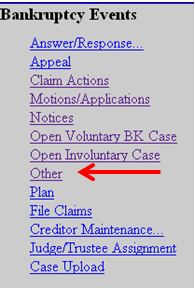
Click Bankruptcy |
|
|
Select Other |
|
|
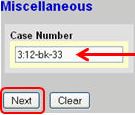
Input case number Click [Next] to continue |
|
|
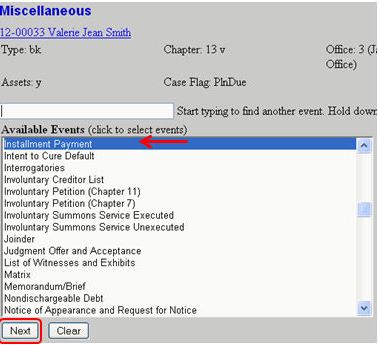
Select Installment Payment Click [Next] to continue |
|
|
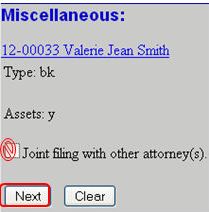
Do Not check the Joint filing with other attorney(s) box. Click [Next] to continue |
|
|
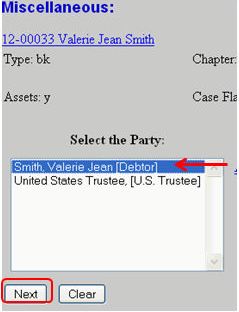
Select the debtor (If joint case select both debtors) Click [Next] to continue |
|
|
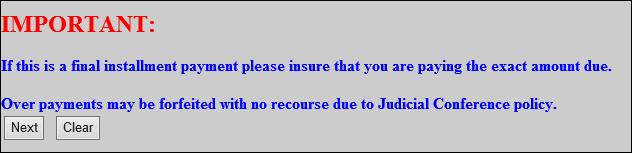
Important – When paying the final installment payment, make sure the payment is the exact amount due. Click [Next]
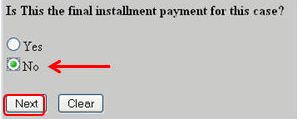
The next prompt asks if this payment is the final payment.
|
|
Section 2: Instructions for Making the 1st, 2nd, or 3rd Installment Payment |
|
|
Not the final installment, select No. Click [Next] to continue |
|
|
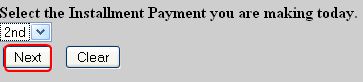
From the drop-down list, select the installment type ( 1st, 2nd, or 3rd) Click [Next] to continue |
|
|
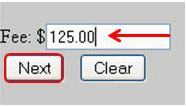
In the Fee field input the payment amount. Click [Next] to continue |
|
|
Click [Next] to continue |
|
|
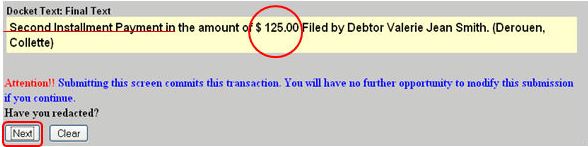
Final Docket Text Screen – Verify the correct installment type (1st, 2nd, or 3rd) and payment amount. If not correct, abort the event to start over. If correct, click [Next] to finish your installment payment.
|
|
Section 3: Final Installment Payment |
|
|
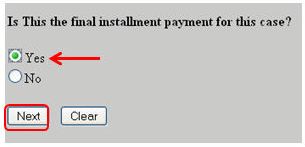
Final Installment Payment, select Yes Click [Next] to continue |
|
|
In the Fee field input the payment amount. Important: Verify the amount is correct. Overpayments may not be refundable. Click [Next] continue |
|
|
Click [Next] to continue |
|
|
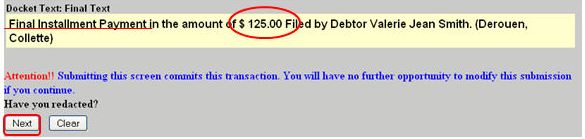
Final Docket Text Screen – Verify the final payment amount is correct. If not correct, abort the event and start over. If correct, click [Next] to finish your installment payment.
|
|
|
Note: A summary of current charges window will appear at the end of the docketing process. You may pay the fee now or continue to file and pay all accumulated fees at the end of the day. |
|